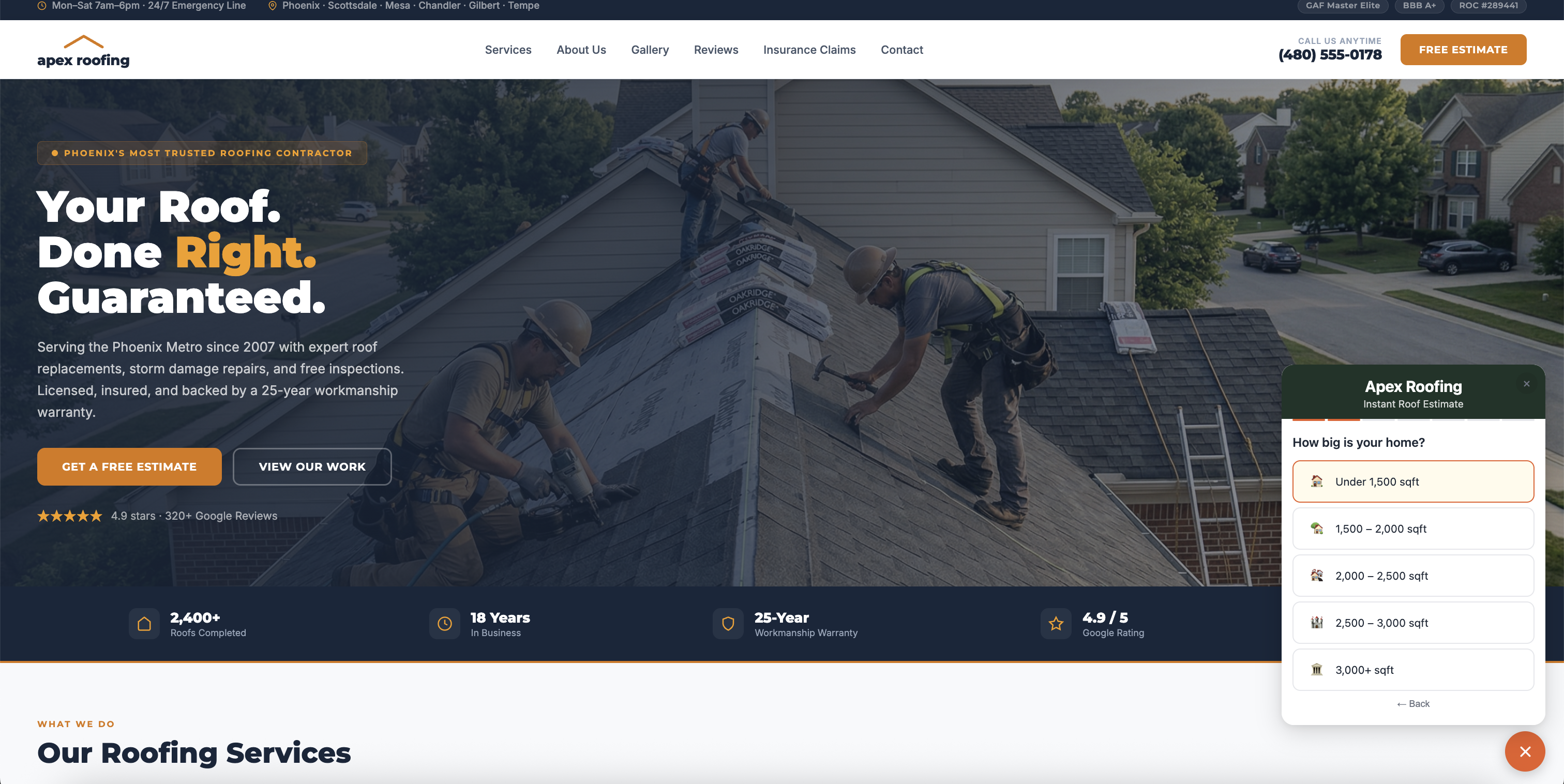
If you're running a GoHighLevel agency with roofing clients, your backend is probably solid — pipelines, automations, follow-ups.
The problem is the front end.
Most roofing websites still rely on contact forms. Homeowners don't fill them out — they leave. And your client's GHL pipeline never sees those leads.
This guide shows how to fix that by adding a roof estimate calculator that captures and qualifies leads directly into GoHighLevel — no Zapier, no manual entry.
Why Roofing Websites Lose Leads Before They Ever Reach GHL
Most roofing contractor websites offer one of two things: a phone number, or a "Get a Free Quote" contact form. Neither converts well in 2026.
Phone numbers only work when someone is ready to call — and most homeowners researching roof replacement aren't there yet. Contact forms ask for name, email, and phone with nothing in return. The implicit ask is "give us your details and we'll call you to discuss pricing." Homeowners who aren't ready to commit just close the tab.
The result is a CRM full of leads from paid ads — which you're paying for — but almost nothing from the organic website traffic your clients are already receiving. Every homeowner who found the contractor through Google, a yard sign, or a referral and then left without converting is a missed lead your GHL pipeline never saw.
Alternative Ways to Capture Roofing Leads in GoHighLevel (And Why They Fall Short)
Before covering the solution, it's worth being clear about what already exists inside GHL and where each option breaks down.
GHL forms. The native form builder captures contact details cleanly and pushes directly to GHL. The problem is it gives homeowners nothing in return for filling it out. No immediate value. Completion rates for cold website visitors are typically very low.
GHL surveys. Multi-step surveys feel more engaging than a single form, but they still end with a "we'll be in touch" outcome. The homeowner still walks away without knowing anything about their project cost. There's no incentive to finish.
Zapier integrations. You can connect third-party form tools or calculators to GHL via Zapier, but this adds a point of failure, an ongoing subscription cost, and delays in lead delivery. Agencies managing multiple client sub-accounts also have to maintain Zapier connections per account — it becomes a maintenance burden fast.
Manual import. Some contractors receive leads by email and manually enter them into GHL. This is exactly as painful as it sounds, and leads that require manual entry have a way of getting lost or delayed during busy periods.
Chat widgets. Live chat and AI chat widgets can engage website visitors, but most homeowners on a roofing website aren't looking for a conversation. They're trying to understand whether they can afford a new roof. A chat widget doesn't answer that question.
All of these capture contact details.
None of them capture intent.
What Actually Gets Homeowners to Convert: Give Before You Ask
The highest-converting pattern on roofing websites right now is the instant estimate flow. Instead of asking for contact details upfront, you give homeowners something first — an immediate estimated price range for their roof.
The flow works like this:
- Homeowner sees a calculator on the contractor's website
- They answer 4-5 quick questions: ZIP code, home size, material preference, project timeline
- They receive an instant estimated range — something like "$9,200 - $12,400"
- To receive the full breakdown, they provide their name, email, and phone
By the time they hit the contact step, they're already invested. They've answered the questions. They've seen a number that's relevant to their actual situation. Estimate-first flows consistently outperform static contact forms because homeowners receive real value before being asked for anything — the exchange feels fair.
The gap between a homeowner landing on the website and becoming a qualified contact in GHL is where most roofing agencies lose pipeline value. This flow closes it.
How to Add a Roof Estimate Calculator to GoHighLevel (Step-by-Step)
Here's exactly how to connect a roof estimate calculator to your client's GHL sub-account and start generating roofing leads in GoHighLevel automatically.
Step 1: Install the calculator on your client's website
A tool like EstimateSnap installs with a single embed code — one script tag you paste wherever you want the calculator to appear. It works on GoHighLevel landing pages, WordPress, Webflow, Squarespace, or any custom site.
<script src="https://app.estimatesnap.com/widget.js"
  data-id="your-calculator-id">
</script>
From the homeowner's perspective, the calculator is a native part of the contractor's website — branded with their colors, their logo, their company name.
Step 2: Configure the estimate logic for your client
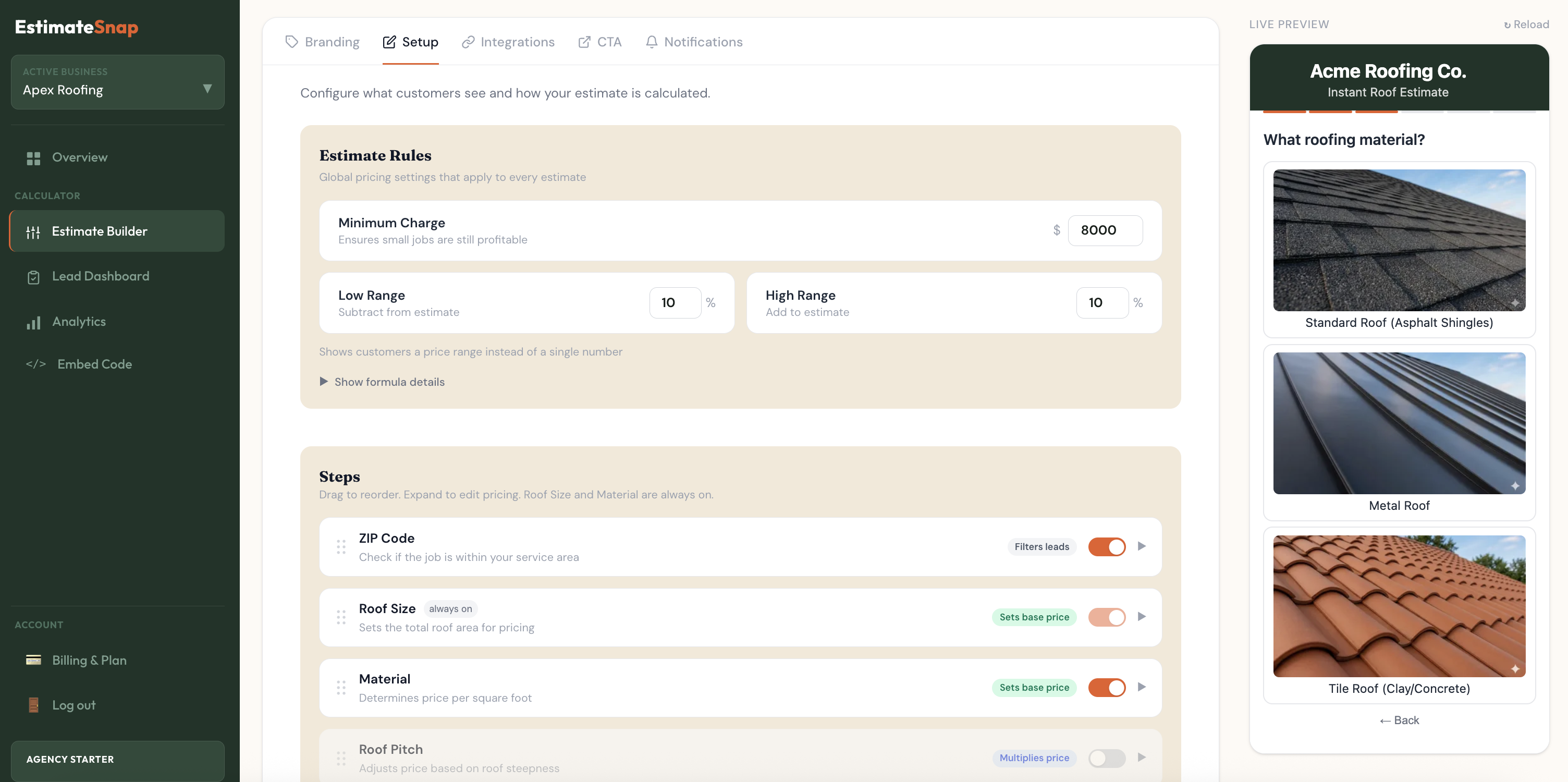
Inside the calculator builder, you set up:
Material pricing — the contractor's actual $/sqft rates for asphalt shingles, metal roofing, tile, flat roof, and other materials they offer
Service area — a base ZIP code and radius in miles. Homeowners outside the service area see a custom message instead of the estimate flow, keeping out-of-area leads out of GHL entirely
Lead scoring — the calculator automatically assigns a priority (HIGH / MEDIUM / EXPLORING) based on timeline urgency and project size
This takes 10–15 minutes per client and requires no developer work.
Step 3: Connect to the client's GHL sub-account via OAuth
EstimateSnap connects to GHL using native OAuth — the same authorization flow GHL uses for all marketplace apps. Once connected, every estimate submission automatically:
Creates a contact in the linked GHL sub-account with full homeowner details
Creates an opportunity in the client's GHL pipeline, placed in the configured stage immediately — no manual creation needed
Applies an estimatesnap tag so your GHL automations can identify calculator leads instantly
Populates custom fields with the project context: estimate amount, material, roof size, and ZIP code
No Zapier. No manual import. No webhook configuration. The contact and opportunity appear in GHL within seconds of the homeowner submitting.
What GHL Receives for Each Lead
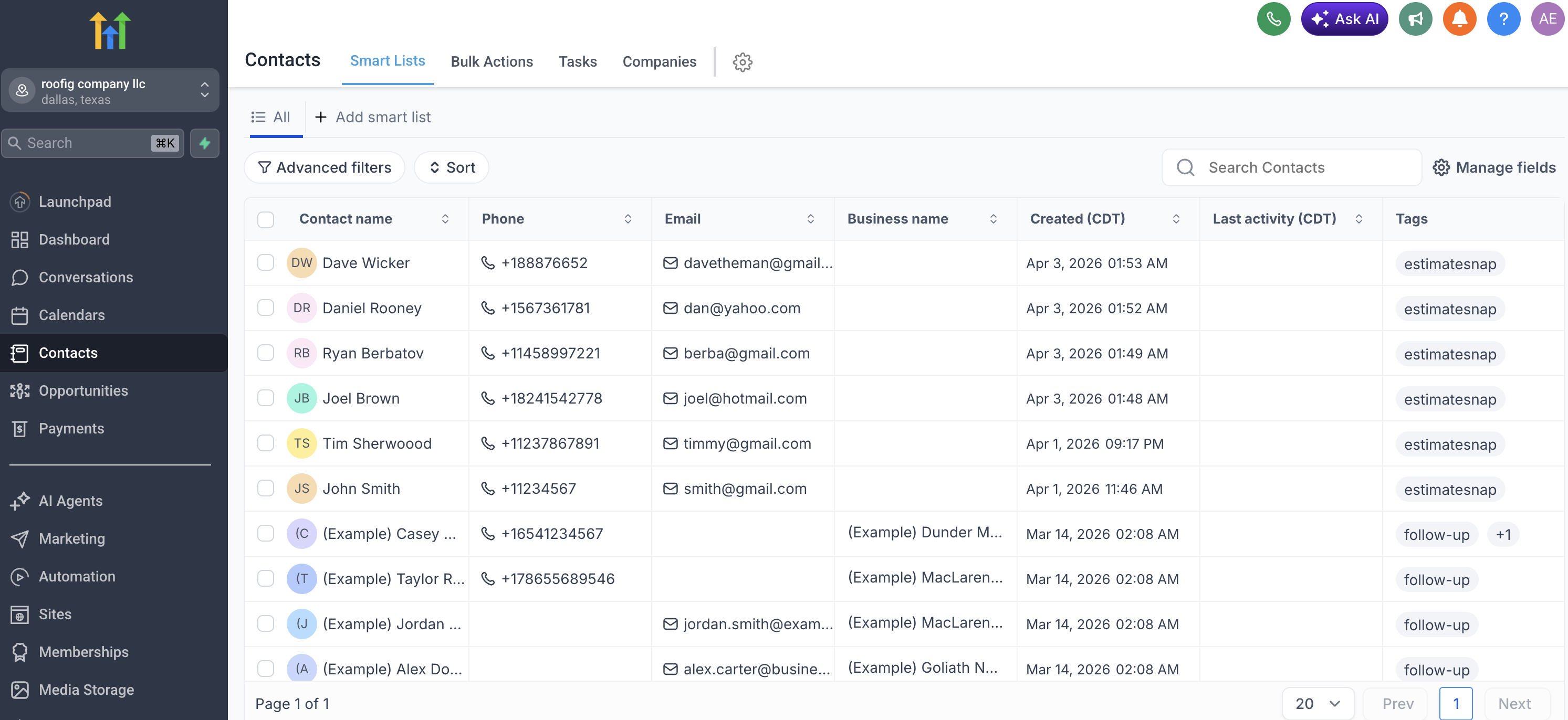
Every estimate submission pushes the following into the client's GHL sub-account:
| Field | Example Value |
|---|---|
| Contact name | Sarah Johnson |
| sarah@email.com | |
| Phone | (602) 555-0143 |
| Opportunity | Created in pipeline automatically |
| Tags | estimatesnap |
| EstimateSnap Estimate | 39000 |
| EstimateSnap Material | Tile / Clay |
| EstimateSnap Roof Size | 2,000 – 2,500 sqft |
| EstimateSnap ZIP | 85018 |
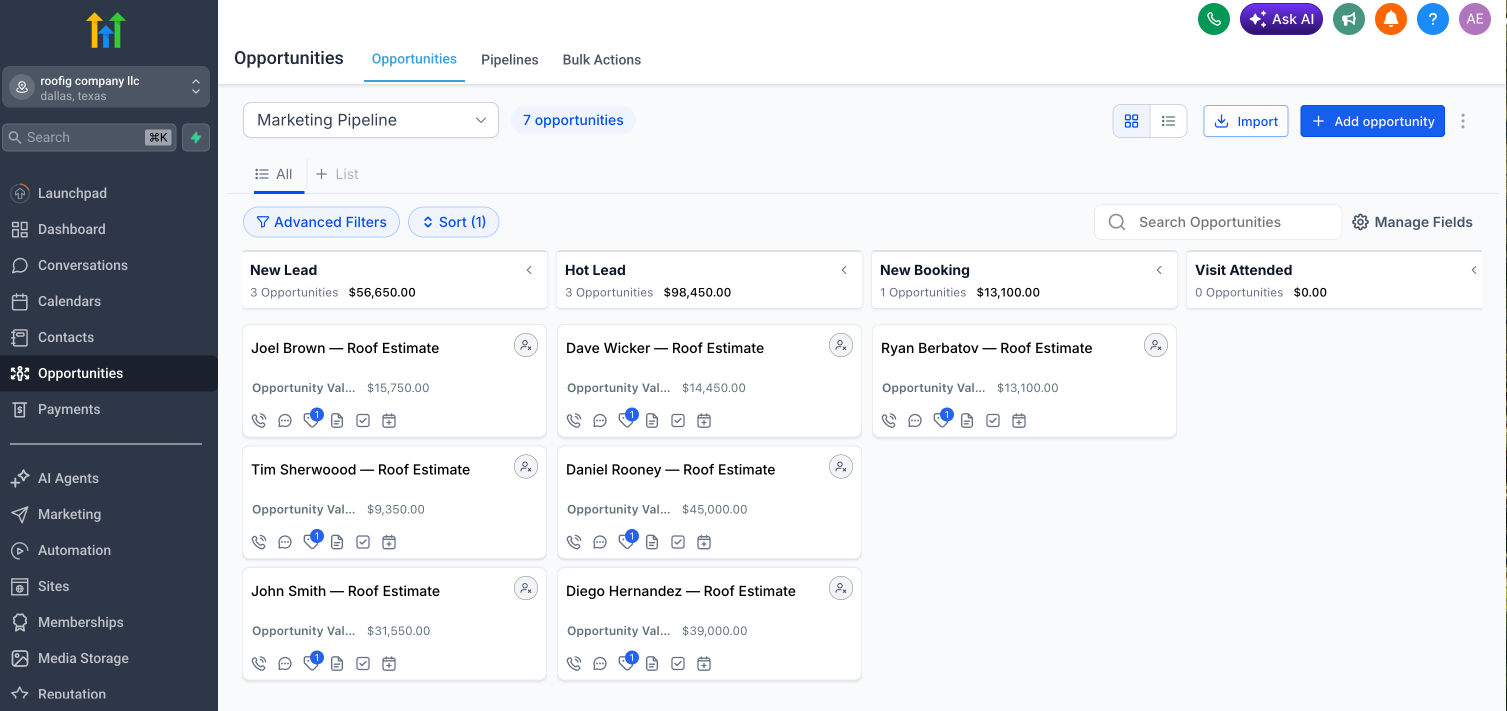
The estimate data attached to each contact is what makes your GHL automations smarter. You can see at a glance what material they want, how big the roof is, and what the estimate came out to — all without a single phone call. Right now, most roofing agencies treat all incoming leads the same because they have no qualification data at the point of capture. The estimate flow changes that from the first second the lead arrives.
Why This Matters for Agencies Managing Multiple Roofing Clients
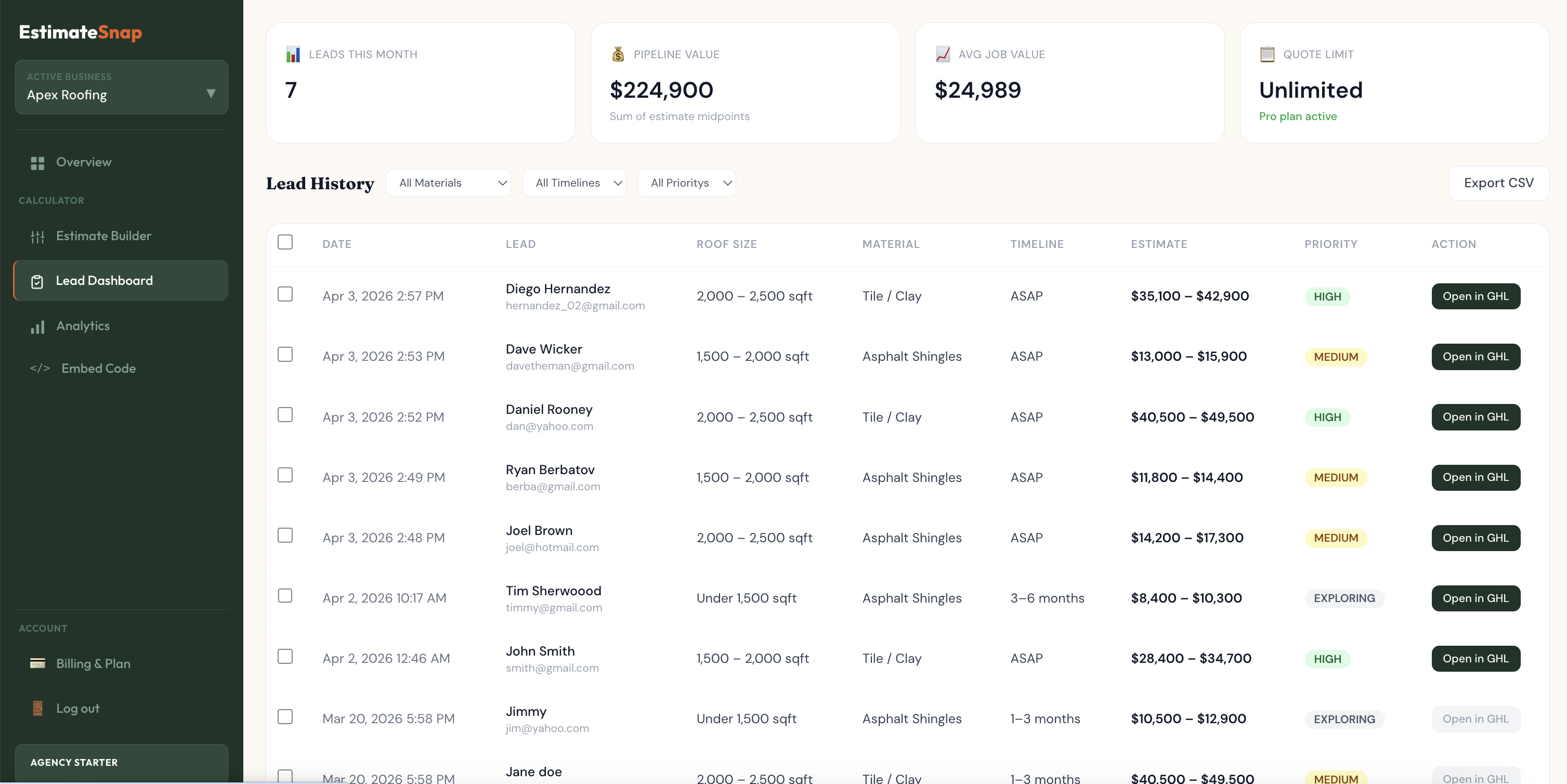
If you're an agency generating roofing leads with GoHighLevel across three, five, or ten contractor sub-accounts, the leverage here compounds.
You configure the calculator once per client — their pricing, their service area, their branding. Each client gets their own dashboard showing lead volume, pipeline value, and estimate history. Each client's GHL sub-account receives contacts and opportunities tagged and prioritized automatically. After setup, you don't touch it.
This is the difference between handing a roofing client a GHL account and handing them a GHL account that actively captures and qualifies leads from their existing website traffic. The second version is stickier. It's harder to churn. And it's a concrete, visible result you can show in a monthly agency report — leads generated, pipeline value added, estimate volume by month.
The Gap This Fills in a Standard GHL Roofing Stack
A typical GHL roofing agency setup looks something like this:
Facebook or Google ads → GHL landing page → contact form → pipeline
Missed call text-back workflow
Review request automation post-job
Reactivation sequences for cold leads
That's all solid. But notice what's missing: organic website traffic. Homeowners who find the contractor through Google, a yard sign, a referral, or a neighborhood post — and land on the contractor's website — have no path into GHL other than a contact form they won't fill out.
Adding a roof estimate calculator to the stack captures that traffic. It turns passive website visitors into active contacts and opportunities inside your client's GHL pipeline, using traffic the client is already getting and currently losing.
Getting Started
If your clients already have website traffic, this is the fastest way to turn that traffic into qualified pipeline inside GoHighLevel — without adding another Zapier workflow or asking a developer to build anything custom.
EstimateSnap has a free plan that lets you trial the calculator on one roofing client account. Paid plans start at $49/month for unlimited estimates on one account, with agency plans for managing multiple clients starting at $99/month.
The GHL integration is available on all plans. Setup takes under 15 minutes.